Shade selection has always been one of the most deceptively difficult tasks in restorative dentistry.
Even with high-end cameras, good lighting, and experience, matching a tooth to a shade guide is still influenced by:
- Ambient light conditions
- Camera auto-adjustments
- Surface reflections
- Regional color variation across the tooth
- Human perception bias
What if we approached shade selection not as a “pick the closest tab” problem — but as a structured color comparison problem grounded in color science?
That’s the idea behind Shade Master.
👉 GitHub: https://github.com/elselawi/shade-master
👉 Download the app: Shade Master – Shade Matching for Dentists
Continue reading if you’re interested in the tech and the algorithm behind the app.
The Problem with Traditional Shade Matching
Natural teeth are not a single color.
They are:
- Brighter at the cervical third
- More chromatic in the middle
- More translucent and darker at the incisal edge
Most digital shade apps reduce the entire tooth to a single averaged RGB value. That approach throws away critical information.
Shade Master does something different.
It treats shade selection as a multi-region color comparison problem using perceptually accurate color spaces.
The Core Idea Behind the Algorithm
Instead of comparing raw RGB values, Shade Master:
- Splits the tooth into multiple regions
- Extracts representative colors from each region
- Converts them to CIELAB (a perceptually uniform color space)
- Compares full tonal distributions instead of single color points
- Selects the shade with the lowest average Δ (Delta E)
This is not just picking a color.
It is comparing two color distributions intelligently.
How the Algorithm Works
Here’s a simplified breakdown of the process.
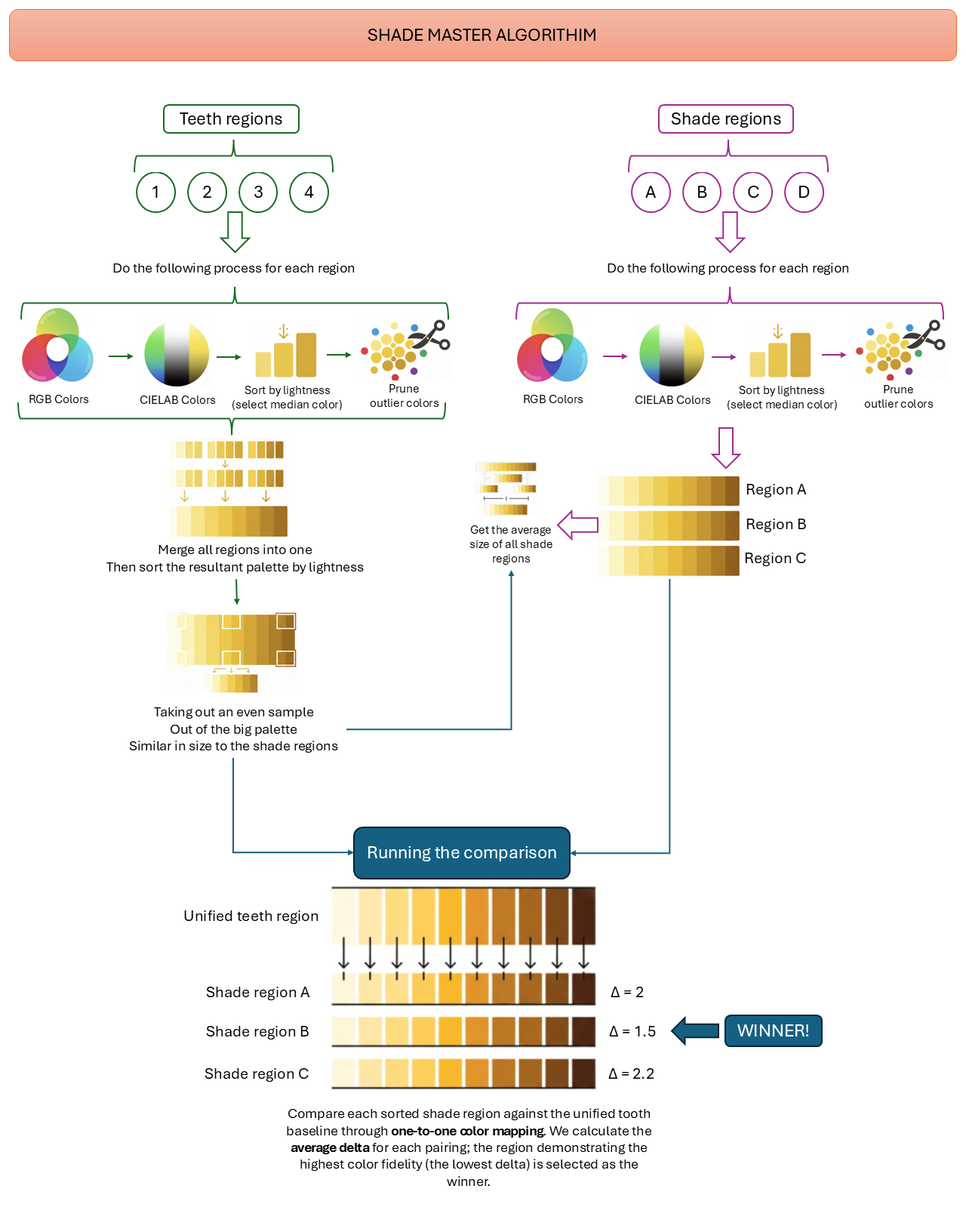
Step 1 — Divide the Tooth Into Regions
The clinical tooth image is divided into structured regions (for example: cervical, middle, incisal).
Each region is processed independently.
Step 2 — Extract Representative Colors
For each region:
- RGB pixels are collected
- Converted to CIELAB
- Sorted by lightness (L*)
- Outliers are pruned
- The median brightness color is selected
Why CIELAB?
Because CIELAB models human color perception more accurately than RGB.
Equal distances in LAB better represent perceived color difference.
Step 3 — Build a Unified Tooth Palette
All cleaned regional palettes are:
- Merged
- Re-sorted by brightness
- Evenly sampled to match the size of shade region palettes
This creates a structured tonal fingerprint of the tooth.
Not just one color — but a gradient signature.
Step 4 — Process Each Shade Tab the Same Way
Each candidate shade (A, B, C, D, etc.) goes through the same pipeline:
- Region segmentation
- RGB → CIELAB conversion
- Brightness sorting
- Outlier pruning
The shade is now represented as a structured color distribution.
Step 5 — One-to-One Tonal Mapping
Instead of averaging everything into a single number, Shade Master:
- Aligns sorted tooth palette with sorted shade palette
- Performs one-to-one mapping
- Calculates ΔE for each paired color
- Computes the average Δ
The shade with the lowest average Delta E wins.
Not the brightest.
Not the closest in RGB.
The one with the highest overall tonal fidelity.
Why This Matters Clinically
For dentists:
- Accounts for cervical-to-incisal variation
- Reduces operator bias
- Uses perceptual color space (CIELAB)
- Produces repeatable, objective comparisons
- Improves communication with labs
It transforms shade matching from a subjective judgment into a measurable comparison.
Why This Matters Technically
For developers:
Shade Master demonstrates:
- Practical use of CIELAB color space
- Outlier rejection for real-world image noise
- Brightness-based palette alignment
- Distribution comparison instead of centroid comparison
- Deterministic selection using ΔE metrics
It’s an applied example of:
- Image processing
- Perceptual color science
- Data normalization
- Matching algorithms
All implemented in a lightweight application architecture.
Designed by a Dentist Who Codes
Shade Master isn’t an academic prototype.
It was built by a practicing dentist who understands:
- The frustration of real shade matching
- The limitations of chairside lighting
- The variability of natural dentition
And also understands:
- Color mathematics
- Software architecture
- Deterministic algorithm design
That combination matters.
Final Thoughts
Shade selection should not depend solely on the human eye.
With structured regional analysis and perceptual color matching, we can:
- Reduce remakes
- Improve lab communication
- Increase restorative accuracy
- Standardize digital shade selection
Shade Master is a step toward that future.
Leave a Reply